
Getting Started
Onboarding, quick start guide, and how to request your platform application.
The Untis Platform is the integration layer for connecting platform applications with Untis Platform. It provides a consistent set of building blocks — UI integration, Data exchange via APIs, and Single Sign-On — that platform applications combine depending on their use case.
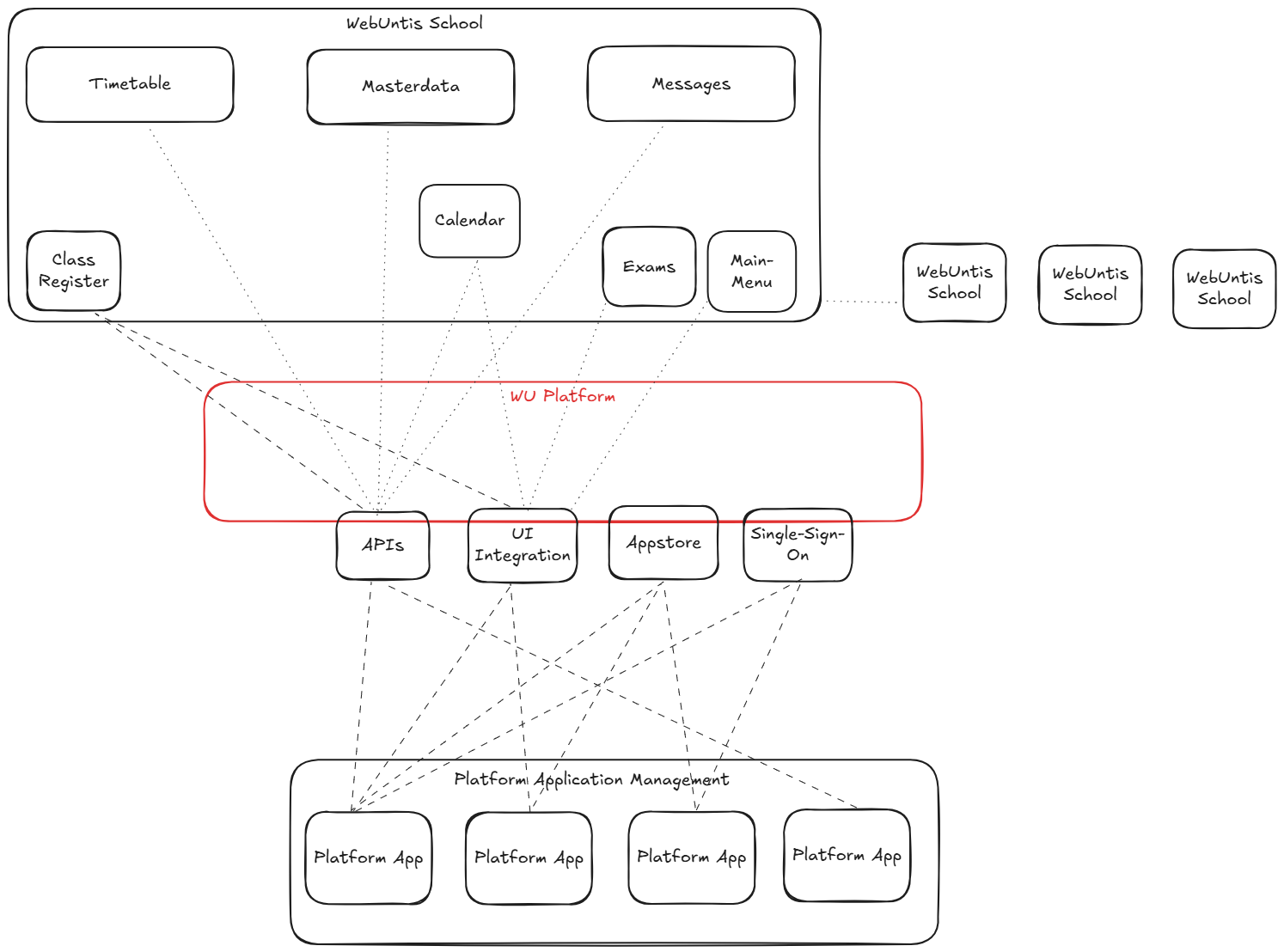
Platform applications are built from three building blocks. You can combine them freely depending on your use case.
A platform application is the unit of integration on the Untis Platform. It represents your product’s registration and holds the full configuration for how your application integrates: which UI entry points it appears in, which APIs it can access, how users are authenticated, and how credentials reach your system.
Everything in this documentation — authentication flows, webhook endpoints, API access, UI entry points — is scoped to a platform application.
Platform applications are configured in the platform application manager (PAM). This is the app store for Untis Platform integrations: school administrators browse available applications and activate the ones they want to use. Once activated, the application becomes available to the school’s users according to its configured entry points and role visibility.
Follow Get Your Platform Application to request your platform application setup.
When a school activates your platform application, the platform provisions a set of credentials for that school to your system. This is called credential transfer. Two modes are supported:
Automatic transfer is strongly recommended — manual transfer does not scale and is error-prone. See Credentials Webhook for implementation details.
Platform applications are tenant-aware: each school is a separate tenant. Credentials are provisioned per school and must be stored and used per school. A single set of credentials cannot be used across multiple schools.
Getting Started
Onboarding, quick start guide, and how to request your platform application.
Core Concepts
Authentication model, authorization model, and cross-cutting patterns.
API Reference
Which APIs to choose and how to use them — OneRoster and Untis Platform APIs.
Which API to Choose · API Overview · Common Concepts · Untis Platform APIs · OneRoster APIs
Integration Guides
Task-oriented guides for UI integration, SSO, webhooks, and calendar.
UI Integration · SSO · Webhooks · Calendar API · Example Workflows